Andy Ramblings

Entries tagged as Software Review

  • Homepage
  • About
  • Gallery
  • Archives
  • Contact

Entries tagged as Software Review

Related tags

Firefox art china days europe General Mozilla photo weather annoyance birthday Brussels bst bush clocks drunk earth Flash gmt health host humour me microsoft news News - UK News - USA noise rubgy Serendipity Test travel internet Bloggers law Review software review brussels Entertainment general Humour software stupid things warnings windows 7 fun review hardware PC england sports

Jan 10: Windows 7 Beta 1

Windows 7 LogoOK, in the techy world of beta testing. Microsoft announced that it was letting loose the next Version of Windows, names imaginatively Windows 7.  Better than giving it a name like vista, which quite frankly was daft. Anyway, MS announced that they will be releasing Beta 1 of Windows 7 at 20:00GMT to the world, but they said that they would only allow 2.5million CD keys. So, yours truly was there, waiting for the server gates to open, so that I could get a CD Key. Wow, were Microsoft so unprepared?!

Firstly by saying that they would only allow 2.5 million keys, they were bound to get a rush on their servers. SO, what happens? yep the party is over.

Due to very heavy traffic we’re seeing as a result of interest in the Windows 7 Beta, we are adding some additional infrastructure support to the Microsoft.com properties before we post the public beta. We want to ensure customers have the best possible experience when downloading the beta, and I’ll be posting here again soon once the beta goes live. Stay tuned! We are excited that you are excited!
Source


I know, this may sound silly, but why didn't MS predict this? It might have been a good idea to use Torrents, rather than try and have 2.5 million users trying to download from a server farm, But that's Micorsoft for you. Torrents for them always = bad stuff. But it is the most efficient way to send a high volume of very large files.

The 32Bit version downloads as a 2.5G file, the 64bit version runs at 3.2GB file. Yep, Torrents are a lot quicker.

Now need to hang around to get that CD Key!

Update: Website to download a beta copy of windows 7 is open again.. find it here. You will be able to download both the 64bit and 32 bit versions and their CD keys.
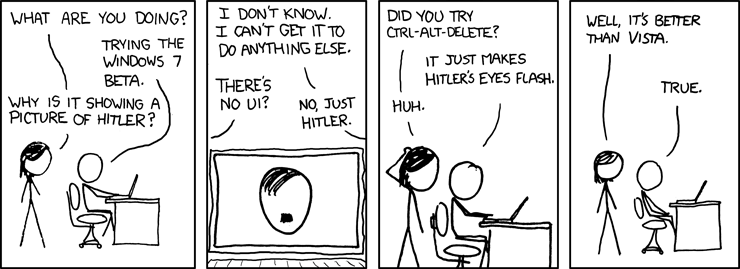
Cartoon Windows 7


Posted by Andy Rambling in Review Comments: (0) Trackbacks: (0)
Defined tags for this entry: microsoft, software review, windows 7

Jan 4: out an about and no graphics application

This could happen, maybe not out and about, but just out on holiday and have no access to your favourite graphics application and the only one available is the sad excuse that Microsoft provides, you know, Paint.. Well, worry no more. Some cool guys up in Finland have produced a pretty neat website, that has a fully fledged graphics program.
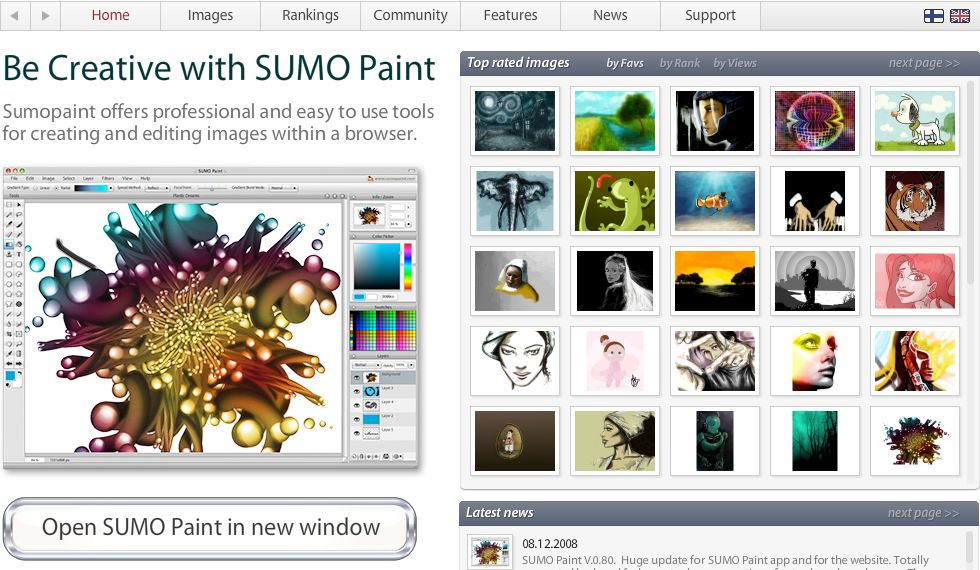
www.sumopaint.com

It's very easy to use, you can if you want, have your account on the webiste. You can of course upload images, which is where the application comes into it's own. Just a sneek preview of what you get to play with....

www.sumopaint.com Screen

Not much of a review, but I think it's darn neat, can be useful. if you want to make nice wonky images when your bored at the office ? not that I'm recommending that you

Oh you want the URL ? well, here is its... www.sumopaint.com

Go on, give it a try 8-) you know you want to .

Posted by Andy Rambling in Review Comments: (0) Trackbacks: (0)
Defined tags for this entry: internet, photo, review, software review

Feb 9: Updated Theme

A new year, a new theme, OK, I know it's Feburary, but January was went by far too fast. So, what to do think ?  I like it, It's clean, a bit nippier but that's all relative to how fast ones internet access is.

So, so far this year, not much has happened, I'm still waiting for the Canon 450D not yet out, but I'm not deperate enough to came for a week out side some local camera shop, like some fools fo for getting a crap mobile phone, you know the one, that ipod with a phone bulted on, yep the iPhone. You can of course see some of the photo's that I have been taking over the past, with various degrees of success, from a film camera, those throw away ones, to mobile phones to a borrowed Canon 400D over at my gallery, (link above)

Other than that, not much, I may write about some Bishop who thought it might be a bright idea to kind of suggest that it may be unavoidable that we should have religious laws to be included in a Non-Secular legal system. I think this will not happen.

That's all folk(s) :-D

Oh and Ireland lost against Frence in the Rugby... Boo, just 5 mins more and I guess we could have done it.


Posted by Andy Rambling in General Comments: (0) Trackbacks: (0)
Defined tags for this entry: General, rubgy, Serendipity, Software Review

Sep 4: Spybot Anti spyware

Final after many years, my favorite free anti-spyware program has come out with a new version, yes, I'm talking about Spybot Search and Destroy has finally made it to 1.5.1!   What does it have? Check the list below,

  • Restored Win95 compatibility
  • Improved Wine compatibility
  • Fixed HyperThreading issues
  • Improved 64 bit immunization
  • Create Portable.ini in main folder to use app folder as data folder as well
  • New warnings about missing admin rights on Windows Vista
  • Support for multi-line bookmarks (IE 7 / Vista)
  • New Immunization for Firefox & Mozilla
  • Improved Immunization for Opera
  • "Single excludes" now include filenames to be more unique
  • Improved settings retrieval from registry (mixed installations)
  • Fixed .reg import bugs
  • Added support for automated removal of F/Ps from host lists
  • Changed update UserAgent and Referrer
  • Improved (Vista-compatible) support for fast user switching
  • Updater now in separate executable file
  • Vista manifests for assigning required rights to each application
  • Deactivated list of active ports per process for Vista (incompatible)
  • Fixed support for handle list on 64 bit systems
  • Improved disabling/enabling BHOs
  • New special error reporting for beta versions
  • Support for Windows Error Reporting for public versions
  • Fixed update-related crashes on Vista
  • Fixed memory leaks (replaced Indy with Synapse)
  • Vista-compatible MSI installer for those who like/need that
  • Support for alpha tests on services and domains lists
  • Added hundreds of new automated tests of internal functionality for prerelease QA
  • Added TeaTimer hide icon (disabled) registry value in installer
  • Improved PE detection all over the place
  • New 64 bit detection all over the place
  • Improved file removal methods
  • Added optional custom RecoveryDir setting in Default.ini
  • Automatic guessing of "Download Dir" folders
  • Added support for renaming services before stopping/killing/deleting them
  • Improved plugin support (example: current TCP/IP Plugin)
  • Support for regular expressions nearly all over the SBI interface

To get it go here:

From Fileforum

The home site for spybot.

Filehippo

Posted by Andy Rambling in Software Review, Software Review Comments: (0) Trackbacks: (0)
Defined tags for this entry: software review

Mar 11: Playing with Vista

Yep, a very short review on Vista. Not that I have bought it or anything, or that I have it on my main PC. I have a copy as I was testing it. So the copy I have will run out sometime in June. Even by then, I don't think I'll be getting it.

You may have noticed TV/Newspaper/Poster ads that go on about the WOW that people will will say when they first see/use it for the first time. I certainly didn't say that when I first saw it. It was more wow crap! Oh you want to see some of those ads?

Here's some from Waterloo Station London: (source)

Bleedin' dull you have to agree.

One of the much vaunted features is the parental control. So I had a look and well, it was kinda funny and you would wonder who was involved in the request. Check out the image...

Rather amusing don't you think?

Anyway, if you do decide to take the jump to Vista, my suggestion is, don't, well not now anyway, I would wait till the first service pack is out. Otherwise stay with your XP.
If your a MAC user and have one of those INTEL based ones, I'm sure Vista will work on that in the not too distant future with Bootcamp 2.

If you want more info on Vista clicky here.

Posted by Andy Rambling in Software Review, Software Review Comments: (0) Trackbacks: (0)
Defined tags for this entry: microsoft, software review

Jan 31: why Microsoft can't make things easy

So, yesterday was the launch of the latest version of windows. Vista is now with us, and as far as I'm concerned, I've been using it for a while as I got a beta version (test version) and am not 100% impressed with it. But I'll let you watch Bill Gates talking to John Stewart from the daily show.

Say no more, No wonder it's so confusing! Bill obviously doesn't know what simplicity is.
Posted by Andy Rambling in News, News Comments: (2) Trackbacks: (0)
Defined tags for this entry: microsoft, Software Review

Nov 29: Windows Vista

Well, I'm sure most of you will know that Microsoft will be releasing their new fan dangled operating system called Vista. Ooooo!
Well, to make things easier for us consumers it has come out with a master plan, easy to understand plan, they have come out with 5 different versions.
  • Windows Vista Basic
  • Windows Vista Home Premium
  • Windows Vista Business
  • Windows Vista Ultimate
  • Windows Vista Enterprise (you won't be able to get that one)
Yep that was the master plan to make it easier for us consumers to decide. But if your confused they have done a little video so that you can understand the differences between them, well it's for the retailers, like the folks at PCworld.
Watch it here. Yep, we consumers will be darn confused.

In order to simplify the process even more, they, have come up with master plan B, this is those fandangled logos, you know the ones that at the moment say, certified to work with Windows XP? Yep, they have the same for windows Vista, but they have been clever, yep, in that ultimate quest to make sure that they don't confuse us consumers, they have come with not one logo but two! And here they are...

There, I can guess you are even more confused? Well, back to Toms World, they have another video to help explain the difference between the two logos, remember these videos are for the folks at Walmart, PCworld and the likes.
Watch the video here.
Here's what Microsoft explanation.
Certified for Windows Vista
Certified for Windows Vista Products that carry the "Certified for Windows Vista" logo have met explicit standards of reliability and quality, and have been tested and proven to deliver a superior experience with a PC running Windows Vista. Using software and devices bearing this logo with Windows Vista Home Premium, Windows Vista Enterprise, or Windows Vista Ultimate edition provides the richest PC experience.

Works with Windows Vista
 Works with Windows Vista You can have confidence that a hardware or software product displaying the "Works with Windows Vista" logo will easily work with Windows Vista and deliver a reliable experience. These products meet baseline standards of functionality on all PCs running Windows Vista.

There you go, there will be more of those clever videos at this site.

More reviews on Viste to come...
Posted by Andy Rambling in Software Review, Software Review Comments: (0) Trackbacks: (0)
Defined tags for this entry: microsoft, software review

Jul 27: Microsoft to 'force' you to Upgrade

Yep, Microsoft is intending to force you to upgrade to IE7 upon you like it did with WGA (or Windows Genuine Advantage). I'm no real fan of IE, as I have been getting started in creating website. IE is the biggest pain, it basically just can't do anything right on the design front. I ended up spending more time fixing issues with IE than with Opera or Firefox.

Considering Microsoft haven't done any development on IE since it was released with Windows XP, that's 2001. It was the storming success of the likes of Firefox and Opera that got MS off it's lazy arse, and make a browser that is secure, safe etc. But I don't see MS being able to do that.

Would be wanting to know how to stop Microsoft from installing IE7 on your PC? IS there a way? Well, yes, there is always a way. You mainly have to look at the Microsoft Technet sites. This is where Microsoft 'helps' it's cooperate customers, who would have busy IT depts, who don't want to have IE 7 installed on their staffs PC automatically.  How's it done? suprisingly easy actually, if your aufait with tinkering with the registry, then all you need do is the following.
  Read More
Posted by Andy Rambling in Software Review, Software Review Comments: (0) Trackbacks: (0)
Defined tags for this entry: Software Review

May 1: May Day Holidays Come To An End

As with most bank holidays here in the UK, it was crap weather, neither warm, nor cold. Just yunky.
So what can one do? I could take more photos, get some walking done, to see some sights of London. But the lighting wasn't too good, very gray. So not a day for photography but a day to get my head around my photo gallery. Some of you have ventured in I'm sure, and have seen, what can only be described as work in progress. But no, now it's pretty much up and working, latest software installed and is pretty cool bit of coding by the guys at Gallery2. More on that later.

So, what can you expect from my photo gallery? All sorts of stuff, I would say that wouldn't I. But yes, there is a nice selection of photos from around London, San Francisco, Belgium and finally a nice selection of background images that you are free to take, I found them on the net with no restrictions on them so far.

I have set-up a feature so that you an e-mail pictures to your friends or who ever you like. A feature I'm thinking of is to allow you, the internet surfer,  to have the images as puzzles. If you like any of the images, you can rate them.

So, now you know what's there, why not take a hope over to it here. You can also get to it by clicking on the image that appears on the top right of this blog. but most of all enjoy the work, and the pictures.

Gallery2, what do I like about it? many things,
Mainly it's simple to use. It's easy to install,  and most important, it's free and I control everything (calms down before I start getting delusional )
Posted by Andy Rambling in General, General, Software Review, Software Review Comments: (0) Trackbacks: (0)
Defined tags for this entry: General, Software Review

Apr 29: Testing Performancing A standalone editor for Bloggers

So what is this you ask? Well Performacing is and extension for firefox and Mozilla browsers. What does it do?
Well it allows you to add new content without having to login to your Blogger, Wordpress or  your Moving Type account pages. For me, what's better is that it also works very well with my blogging software, Serendipity which is a fine bit of code from the very nice guys at S9Y 

Performancing has most of the tools you need, a standard editor, a HTML editor and that it, you really don't need more than that. You can even have multiple blogs configured, so it's a one interface that does all interfaces.

Other notable features:
  • Easy Technocati tagging
  • You can see your catagories
  • You can see your previous entreries.
  • You can keep notes.

The extension works by splitting your browser window, with the editor interface either at the top or bottom, this is configurable.
Not sure if this is a must have extension, but a very nice one none the less.
Other features that the folks at performacing offer, is site stats. Will have to give that a spin.
One downside I suppose for this extension is that I don't have access to the advanced publishing features that my blog does on posting which is to ping most blogger trackers to say that I have a new entry in my Blog, I can't comment on other blogging software applications as I've only used this on my software.
Posted by Andy Rambling in Software Review, Software Review Comments: (3) Trackbacks: (0)
Defined tags for this entry: Software Review

Apr 20: FireFox Flicks - Some Of The Best

The good old folks at FireFox have been having a competition for the Firefox community of who could produce a short film showing the merits in a serious or better still an amusing way. I prefer the latter as, well, life is all a laugh and not to be taken too seriously.

So here's a sample. (click on Icon to view)


And By the way, make sure you have checked that you are using Firefox 1.5.0.2, Why? It's just that it's the latests an bestest one yet. 
Posted by Andy Rambling in Software Review, Software Review Comments: (0) Trackbacks: (0)
Defined tags for this entry: Software Review

Apr 5: Apple Will allow you to run WinXP on your Apple

Ok, only on the new ones that use the Intel processor. The question I would like to know is can I get Mac OSX to run on my PC ?
The software you need to allow your Mac to run WinXP is called Boot Camp... I like that name, it's not about what we know as a bootcamp where you send your brats to for summer so that they can come home and be kids again. But i'm sure it's to do with Boot as in Booting up your PC and a Camp where you can leave your tent or in this case where you can safely have a bug ridden winXP running. A nice Idea I have to say

But I want (stamps foot on floor), ok that didn't get me anywhere, I would like to be able to run Mac OSX either via a dual boot (two operating system on one PC, you only run one at a time)  or from within WinXP.

I don't think I'll get the 2nd option but it would be nice ..

Read on for more info on Apples Bootcamp for windows (naughty OS) here

What Mac's can run this software, it's any Mac that has the Intel Duo Core like this MacMini, The IMac, and finally, The Macbook pro so now you can get a very stylish Mac and run Windows XP on it.
I do have to say that the MacBook Pro does look like a nice laptop ...
Posted by Andy Rambling in Software Review, Software Review Comments: (0) Trackbacks: (0)
Defined tags for this entry: Software Review

Nov 29: FIREFOX 1.5 is now available


Firefox 1.5 is now out of beta, out of RC (Release candidate) and ready for the public to enjoy!

To quote verbatim from the new website for Firefox


A Better Web Experience
Enjoy quick page loading as you navigate back and forward in a browsing session. Improvements to the engine that powers Firefox deliver more accurate display of complex web sites, support for new Web standards, and better overall performance.

Automatic Updates
The new Software Update feature makes it easy to get the latest security and feature updates to Firefox. Firefox automatically downloads these small updates in the background and prompts you when they are ready to be installed.

Tabbed Browsing
Use tabbed browsing to open multiple web pages in a single browser window, and quickly flip back and forth. Drag and drop open tabs to keep related pages together.

Improved Pop-up Blocking
Firefox’s built-in pop-up blocker has been enhanced to block more unwanted pop-up and pop-under ads.

Integrated Search
Tap into the power of the Web’s most popular search engines with the built-in Search bar, and easily add new engines.

Stronger Security
Firefox keeps you secure when you’re browsing the Web, closing the door on spyware, worms, and viruses. The Firefox community of developers and security experts works around the clock to monitor security issues and release updates to better protect you.

Clear Private Data
Protect your privacy with the new Clear Private Data tool. With a single click, you can delete all personal data, including browsing history, cookies, web form entries and passwords.

Live Bookmarks
Stay up to date with your favorite Web sites and blogs. Use Live Bookmarks that update themselves automatically with the latest content from the Web.

Accessibility
Firefox 1.5 delivers easier navigation for everyone, including those who are visually or motor-impaired. Firefox is now the first browser to support DHTML, which enables Web content to be read aloud - even new kinds of graphics-rich content. Users may navigate with keystrokes rather than mouse clicks, reducing the tabbing required to navigate documents such as spreadsheets. Firefox 1.5 is also the first browser to meet government requirements that software be easily accessible to users with physical impairments.

Customize Firefox
Select new button controls for your toolbars, install extensions to add new features, or change the look of your browser with themes - the way Firefox looks and works is under your control.

Next Generation Web Support
Innovative new Web applications and services deliver a richer Web experience. Support for open Web standards in Firefox ensures you can get the most out of this emerging class of Web-based tools.


The main Firefox site is now at www.mozilla.com 

To get your copy I would go to this link and get your regional or localised version to your country.

Boo at the time of writing the GB version or most European versions are not available as I enter this comment.

Maybe be tomorrow it will be available. ?? Hopefully.

To view My setting. see my Firefox 1.5 setting link
Posted by Andy Rambling in Software Review, Software Review Comments: (0) Trackbacks: (0)
Defined tags for this entry: Software Review

Nov 11: Firefox 1.5 Release Candidate 2

The final version will hit the internet in the coming week (maybe the 18th). Not many serious bugs fix, but the main one is that the fully automated update system is now running quite nicely thank you.
What is the fully automated update system, it's quite neat in that when there is a patch update, mostly a security update, instead of having to download and install the full download, you only have to download a 200Kb to 500Kb download. The patch update is applied either straight away, (your choose) or you can delay it till you have finished doing what your doing, close the browser, and that's it, when you reload Firefox, the patch update will be installed for you. easy.

One word of warning though if you are using Firefox now, and are also use the extension Adblock, This does not work well at all with Firefox RC2 . I suggest that you get Adblock Plus.
Have fun Click on Image to get the Release candidate.
Posted by Andy Rambling in Software Review, Software Review Comments: (0) Trackbacks: (0)
Defined tags for this entry: Software Review

Nov 2: Firefox 1.5 Release Candidate 1

FireFox which lately has just achived the 100 million downloads earlier last month is now getting ready for it's next version, 1.5  I have been using it for the past few months and yes, as you would expect there were lots of bugs, days when the browser just wouldn't browse or wouldn't work. Days when well, you had to use the older copy that worked. But that's all in a days work for a beta tester. I enjoy doing things like that.. I'm nuts yes.

The next RC should be out before the week is out. The final release of 1.5 should be out soon after depending on last minute bugs.

So, What's new in Firefox 1.5 you ask... here you go, the list.

Read More
Posted by Andy Rambling in Software Review, Software Review Comments: (0) Trackbacks: (0)
Defined tags for this entry: Software Review
« previous page   (Page 1 of 2, totaling 17 entries)   next page »

Local Sunrise/Sunset

Today's Sunrise:03:45
Today's Sunset:20:17
Local Time:14:00

London Weather

Tags Tags,

annoyance art bush days drunk england Entertainment fun Fun Games General health Humour Jokes london microsoft News News - UK News - USA news uk Only In America photos politics Serendipity Software Review stupid things

Ramblers

• The Blair Watch Project
• My Boyfriend Is A twat
• Stop the world I wanna get off
• Elspeth
• PostSecret
• MICAH WRIGHT
• The Dilbert Blog
• Baghdad Burning
• Downing Street Says
• Nick Robinson's Newslog
• Karelian Blonde
• Rob A's (Im)personal Blog
• | The Zahir |
• Talking Points Memo:
• Michael Moore
• diamond geezer
• That's The way Life Is
• Rachel from north London
• Guy Fawkes' blog of parliamentary plots
• Beau Bo D'Or
• Blogzira
• Grumpy Old Man - Keith
• More4 News Blog
• GUYANA
• little.red.boat
• Chocs Away, Old Girl!
• File Hippo
• Live Life Then Give Life
• Tomato And Basil Sandwiches
• PUBLOG
• The Nether-World
• julianhopkins.net
• Ten Percent
• Bloggerheads: The Alisher Usmanov Affair

Search Stuff

Cluster Map

Locations of visitors to this page

Banner

Andy Ramblings
Andy Ramblings
Create your badge Foxkeh
Use OpenDNS
Trillian 4 in 1 IM
Get Trillian, the ultimate instant messenger!
A UK wide PC based TVguide
 DigiGuide, the best TV guide

Want this badge?
  Save Parliament
Powered By
 Serendipity Banner
Serendipity PHP Weblog

My Little Tag Bar

GeoURL British Blog Directory. Firefox Flicks!
Get Thunderbird! Firefox 2


Who Links Here

Enter your Email


Powered by FeedBlitz

Creative Commons License
This work is licenced under a Creative Commons Licence.

Other Pages

Archives

  • June 2017 (0)
  • May 2017 (0)
  • April 2017 (0)
  • March 2017 (0)
  • February 2017 (0)
  • Recent...
  • Older...

Great Web Hosting

* 510GB of Disk Space *
* Over 5TB transfer/Month *
» Unlimited E-mail addresses
» Unlimited E-mail Forwarding
» 1 Free Domain or Transfer
» Free Setup
» Unlimited Domains
» 1000 MySQL Database
» Active Spam Protection
And Many more features
»» All for £4.25 per Month ««
* sign up using the above link, and get 2500MB extra webspace free]

Virus Alerts


Statistics

Last entry: 2013-03-15 17:29
259 entries written
315 comments have been made
7207 visitor(s) this month
11 visitor(s) online
 

Layout by Andreas Viklund | Serendipity template by Carl